Zarden
Plant care that thinks.
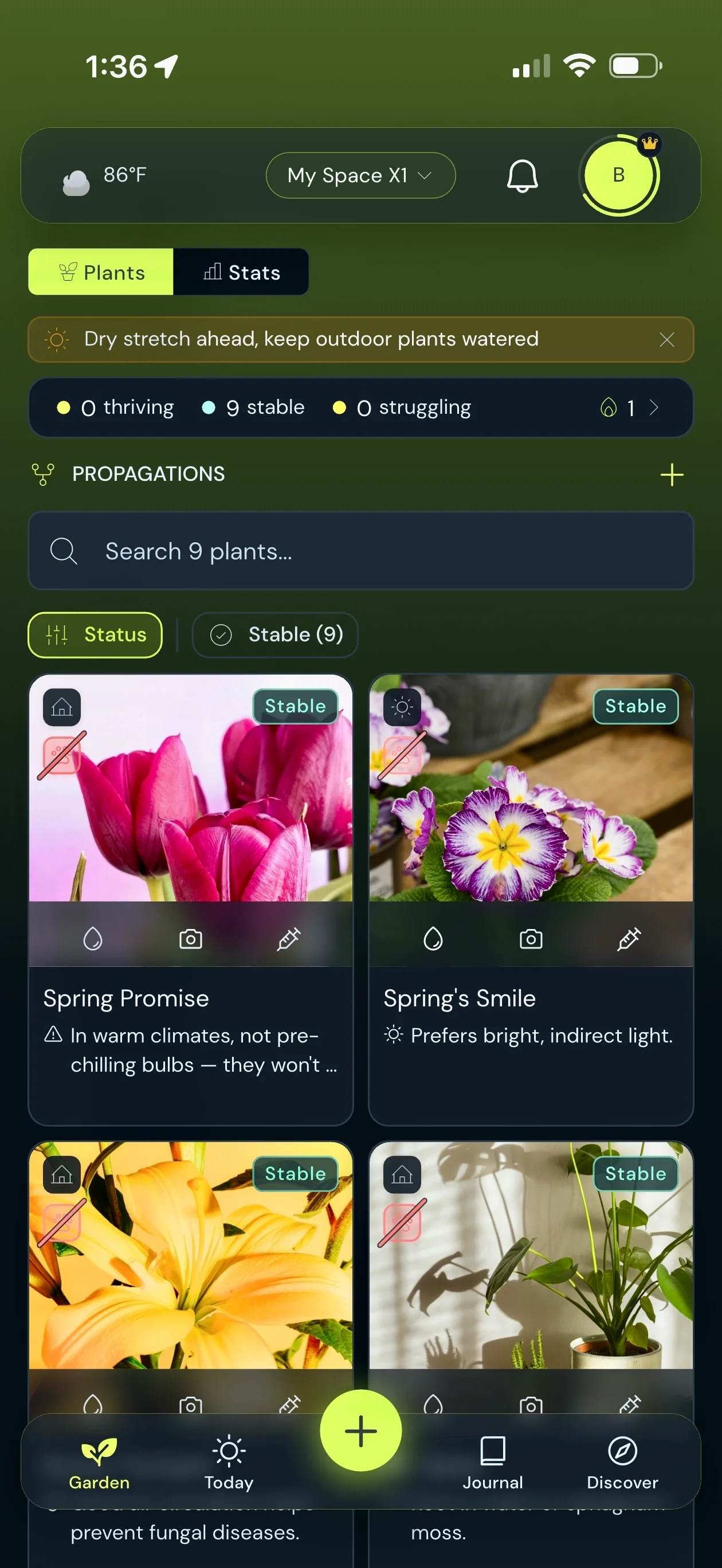
Identify a plant from a photo, see what needs care today, check on a sick plant, and share the garden with your household. Premium and Gold add your local weather to the plan.


- Live
IN THE APP
What Zarden does
Everything here is in the current release.
-
Identify From a Photo
Point the camera at a plant and Zarden suggests likely matches, each with a match percentage. Pick yours and it pulls up a care profile, building one if the plant is not in the catalog yet.
-
A Today List
Today shows the plants that are due. Water, fertilize and check-in buttons sit on every plant card, and each one can be undone. From a plant's menu you can snooze it for 3 days or a week, or mark it dormant.
-
A Care Plan for Each Plant
Every plant gets a care plan with watering, fertilizing, pruning and repotting steps. Watering follows the season: in the cold months, plants with a winter rest wait longer between waterings.
-
Weather in Your Plan
Premium and Gold add your local forecast to the daily plan. For outdoor plants it flags frost, heat and rain, and when rain is on the way you can hold watering until it passes.
-
Check a Sick Plant
Take a photo for a health read, with likely causes and care tips. Start a treatment to follow the plant back to health, and re-check it over time.
-
Light Meter
Gold. Your phone's camera estimates how bright a spot is, and Zarden tells you whether that light is great, too dark or too bright for that plant.
-
Share the Garden
Plants live in a space, and everyone in the space sees and cares for the same plants. Invite people with a QR code. Sharing is free on every plan.
-
A Journal for Every Plant
Each photo check-in is saved to that plant's journal, where you can add captions and delete entries with undo. The Journal can also bring back an On This Day memory from an earlier year.
Premium and Gold
Weather in Your Daily Plan
Premium and Gold read the forecast for your location and put it into the daily garden report.
Frost, Heat and Rain
For your outdoor plants, the daily report speaks up about frost, heat and rain. For example: Frost tonight, bring Monstera inside, or Hot day ahead, 3 plants need extra water.
Hold Watering for Rain
When rain is forecast, a prompt lets you hold watering for your outdoor plants until the rain passes, and you can undo it.
Mark Rain-Watered Plants
When rain has actually fallen, tap the rain banner to mark your outdoor plants as watered.
A Daily Push, If You Want One
Turn the daily garden report on as a notification and pick the time it arrives. It is off until you turn it on.
Health checks
Diagnose and Follow Recovery
A photo gives you a health read. A treatment lets you follow the plant over time.
A Health Read
Healthy, mild stress or concern, with the symptoms Zarden can see in the photo.
Likely Causes and Care Tips
Likely causes come with a percentage, followed by up to three care tips.
Follow a Treatment
Start a treatment and re-check the plant over time. Each re-check shows whether it is improving, holding or worsening, with your photos as evidence.
Re-Checks Are Free
Re-checks inside a treatment do not use up one of your monthly health checks.
Gold
What Gold Adds
Gold has unlimited plants, scans and health checks, and the light meter above. It also adds four more things.
Ask Zarden
Ask a question about any plant and get an answer grounded in that plant's own care history and your local weather. Everyone gets one free question to try it, and the 14-day trial includes it.
Propagation Tracking
Track cuttings, seeds and divisions from started through rooting and sprouting to potted, then turn the result into a plant in your garden.
Deep Insights
A 12-month view of your garden: activity by month, how closely you follow each plant's watering interval, how plant status has trended, and your best streak.
Data Export
Export your garden as a CSV file or a printable Garden Book.
From Unknown Plant to Care Plan, in Three Steps
How it works
Three steps, starting with a photo.
- 1
Snap
Point your camera at a plant. Zarden suggests matches, you pick one, and it pulls up a care profile.
- 2
Save
Name the plant, say whether it lives indoors, outdoors or on a balcony, and save it to your garden.
- 3
Care
Use the buttons on the plant card as you water, fertilize and check in. Snap a health check any time something looks off.
PRICING
Plans and prices
Zarden starts free. New accounts get a 14-day Premium trial with no card needed. Premium and Gold come monthly, yearly or as a one-time lifetime purchase.
Free
No card needed, and no time limit.
Free includes
- Up to 10 plants
- 10 plant scans and 10 health checks to start, then 5 scans and 3 health checks a month
- The Today list, a care plan for each plant, and the plant journal
- A shared garden for your household
Premium
$1.49a month
- Monthly
- $1.49
- Yearly
- $11.99
- Lifetime
- $24.99
Premium includes
- Unlimited plants
- Unlimited plant scans
- 50 AI health checks per month
- Detailed weather context (rain, frost, heat)
- Daily Garden Report push notifications
- Sunday weekly wrap-up card
- Rain watering prompts for outdoor plants
Gold
$2.99a month
- Monthly
- $2.99
- Yearly
- $24.99
- Lifetime
- $49.99
Gold includes
- Ask Zarden: grounded answers about any plant, from its own history and your weather
- Unlimited plants
- Unlimited plant scans
- Unlimited AI health checks
- Detailed weather context (rain, frost, heat)
- Daily Garden Report push notifications
- Sunday weekly wrap-up card
- Rain watering prompts for outdoor plants
- Light meter to find each plant its perfect spot
- Propagation and cutting tracking
- Deep insights across the whole year
- Data export (CSV and a printable Garden Book)
- Priority access to new Zarden features
Prices are in US dollars. Monthly and yearly plans renew automatically until you cancel in your App Store or Google Play account. Lifetime plans are a single payment with no subscription.
PRIVACY
Your Privacy Matters
No ads inside Zarden, and we do not sell your data. Zarden advertises itself, so Adjust measures which ad led to an install and passes install and conversion events to Meta. On iPhone your advertising identifier is used only if you allow it. Photos you identify or check are sent to a cloud AI service, and Firebase handles push notifications, crash reports and usage analytics.
- No In-App Ads
- Never Sold
- Installs Measured
- No Background Location
- Delete Your Data
Common Questions
Is Zarden available now?
Yes. Zarden is on the App Store and Google Play. New accounts get a 14-day Premium trial with no card needed, and you stay on the free plan afterwards unless you subscribe.
What does Zarden cost?
Zarden is free to start, with up to 10 plants. Premium is $1.49 a month, $11.99 a year, or $24.99 once. Gold is $2.99 a month, $24.99 a year, or $49.99 once. Sharing a garden is free on every plan.
What does the free trial include?
A 14-day Premium trial, with no card needed, for new accounts. It also includes Ask Zarden. The other Gold features stay locked during the trial. There is one trial per account and one per device, and when it ends you move to the free plan unless you subscribe.
How does plant identification work?
Take a photo and Zarden suggests likely matches, each with a match percentage. You pick the right one and it loads a care profile, generating one when the plant is not in the catalog yet. A check on your phone first looks for a plant in the photo, and you can choose Identify anyway if it gets that wrong. Free plans get 10 scans to start and 5 a month after that. Premium and Gold are unlimited.
Does it work for outdoor plants, herbs and vegetables?
Yes. You can browse the catalog by tropical plants, succulents, ferns, herbs, vegetables, flowers, fruit and lawn. Each plant is marked indoor, outdoor or balcony, and the rain features apply to outdoor and balcony plants. If you allow location during setup, Zarden works out your growing zone and uses it to adjust care advice.
Can my household share one garden?
Yes, and it is free on every plan. Create a space, invite people with a QR code, and everyone in it sees and cares for the same plants.
What happens to my plant photos?
Photos are stored in your Zarden account, and the members of your space can see the plants you add to it. When you identify a plant or run a health check, the photo is sent through our servers to a cloud AI service to produce the result, and identification first checks on your phone that the photo shows a plant. Photos are not shared with advertisers. You can delete your Zarden data from the app, and the Data Deletion page explains how.
Does Zarden track me?
Zarden advertises itself, so it uses Adjust to measure which ad led to an install. Adjust passes install and conversion events, including the value of a subscription purchase, to Meta. On iPhone, your advertising identifier is used only if you allow it when asked. On Android, the Google advertising ID is used, and you can reset or limit it in your device settings. Zarden also uses Firebase for push notifications, crash reports and usage analytics. It shows no ads inside the app and does not sell your data. The Zarden privacy policy has the details.
How do I sign up?
Open the app and tap once. There is no email, password or third-party login. A 28-character recovery code is shown once, so keep it: it lets you sign back in on another device. You can also move to a new phone by scanning a QR code from the old one, and add an email later if you want to.
Plant care that thinks. Available now.
Download Zarden for iOS or Android. New accounts get a 14-day Premium trial with no card needed.
OUR APPS
More from Zovia
- Zupply The grocery list that learns. Live
- Zyve Family Calendar Live
- Zistil Inventory Management Live
- Zots Counter & Schedule Tracker Live
- Zuzzle Number System Puzzles Live
We build apps for businesses too.
Work with us