Zots
Life in Dots.
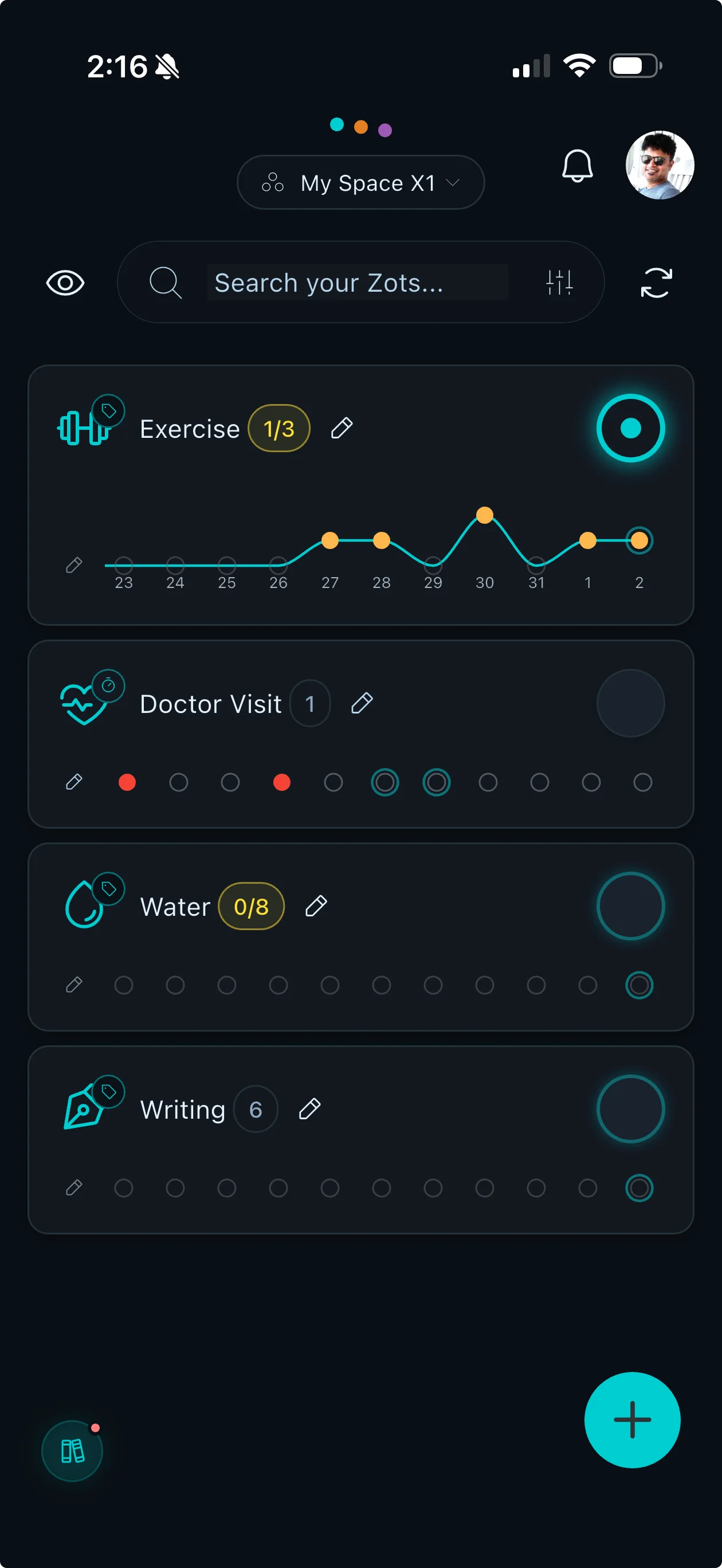
Track habits, counters and recurring tasks on your own or with your household. Every card on Today carries a row of dots for the past week, so you can see what you kept up.

- Live
IN THE APP
What Zots does
Everything here is in the current release.
-
Check It Off
A tap logs a habit or chore for today, and a double tap takes it back.
-
Count It Up
Log a coffee, a glass of water or a workout with the plus button on its card. Add a unit and a goal if you want them.
-
Count To A Goal
Set a goal number and the card shows your count against it, like 3/8.
-
Days Since
Count the days since the last headache or the last time you watered the plants. A swipe restarts the count.
-
Push Reminders
Give a zot a time of day, then choose a reminder at that time, 5, 15, 30 or 60 minutes before, or a day before.
-
Flexible Schedules
Daily, weekly on the days you pick, every few weeks, monthly, every few days, or just once.
-
Calendar Views
See every zot by day, week or month. Swipe to move along and tap a day to focus on it.
-
Fix A Missed Day
Forgot to log yesterday? Open a zot and tap any of the last 14 days to correct it.
-
Tags
Group related zots with tags, then tap a tag on Today to see just those zots.
-
Share With Your Household
Invite family or roommates into a space and see who did what on every zot.
-
Private Zots
Mark a zot private and only you see it. No one else gets notifications about it.
-
Stats
See trends by week, month or year, for you or the whole household, with an activity heatmap.
Built with:
Daily Habits
Track the Everyday
How many coffees this week? When did you last water the plants? Log it in a tap and see the week in dots.
Quick Logging
Tap the button on a card to log it. No forms and no typing.
A Week In Dots
Every card on Today carries seven dots for the past week, filled for the days you logged it.
Undo Built In
Archiving a zot, resetting a counter and restarting a days-since count all come with an undo.
Look Back
Open a zot to see its last 14 days, and tap a day to add, remove or mark it.
Reminders
Never Forget What Matters
Bills, medications, trash day. Set the schedule once and Zots puts it on Today when it is due.
One-Tap Completion
Mark a reminder done for today with a single tap.
Flexible Schedules
Daily, weekly on chosen days, every few weeks, monthly, every few days or once, with an optional start date and end date.
See What's Coming
Today groups your zots into For you, Overdue, Now and Coming up, with an Upcoming list of what is due next.
Choose Your Reminder
Switch push reminders on for a zot and pick the lead time: at the time, 5, 15, 30 or 60 minutes before, or a day before.
Shared Spaces
Track Together
Share with family or roommates and see who did what.
Personal Space By Default
You start in a space of your own. Invite family or roommates when you are ready.
See Who Did What
Cards show who logged last, and the Household tab lists the day's activity.
Household Streaks
Household counts the days in a row that every shared task due that day got done.
Assign Tasks
Assign a zot to someone and follow how the tasks you assigned are going.
Private Zots
A private zot stays visible only to you, even inside a shared space, and sends no notifications to anyone else.
Three Steps
How it works
From an empty list to a week of dots.
- 1
Create What You Track
Pick a preset or add your own. Choose how you track it, when it applies and who sees it.
- 2
Log As You Go
Tap the button on a card to log it. Open a zot to fix a day you missed.
- 3
See The Pattern
Read the dots on each card, then open Calendar and Stats for the longer view.
PRICING
Plans and prices
Zots starts free with up to 10 zots that you create, and everything else in the app is on every plan. Premium and Gold are auto-renewable subscriptions. Premium takes the zot limit away, and Gold adds points for completed tasks, a household reward store and effort balance insights.
Premium
$3.99a month
- Monthly
- $3.99
- Yearly
- $19.99
Premium includes
- Unlimited zots across all spaces
Gold
- Yearly
- $39.99
Gold includes
- Unlimited zots across all spaces
- Points for completed tasks
- Household reward store
- Effort balance insights for fair task sharing
Prices are in US dollars. Premium and Gold renew until you cancel, and you can cancel any time in your App Store or Google Play account settings. The zot limit counts the zots you create across all your spaces, and archived zots do not count.
PRIVACY
Your Privacy Matters
No ads inside Zots, and we do not sell your data. Zots does not collect your location. Anonymous usage analytics and crash reports are collected, as the privacy policy describes.
- No Ads
- Never Sold
- No Location
- Delete Your Data
Common Questions
What can I track with Zots?
Habits and chores you check off, things you count up like coffees or glasses of water, counts toward a goal, the days since something last happened, and tasks that repeat on a schedule, like bills or trash day.
How do shared spaces work?
A space is a shared set of zots. You start in a space of your own and can invite family or roommates. Anyone in the space can edit its shared zots, each card shows who logged last, and the Household tab shows the day's activity. A zot you mark private stays visible only to you.
Can I keep some zots private inside a shared space?
Yes. Mark a zot private when you create or edit it and only you see it. Other members cannot see it, and they get no activity notifications for it.
Can I edit a past day if I forgot to log?
Yes. Open a zot, tap any of the last 14 days, then add or remove a count, or mark that day done or not done. Days-since counters are the exception, because they count on their own.
How do goals work?
Choose Count it up or Count to a goal, then set a goal number. The card shows your count against it, like 3/8.
What happens when I reach my zot limit?
Free includes up to 10 zots that you create. The count covers all your spaces and leaves out archived zots, and zots other people create in a shared space do not count against you. Premium and Gold have no limit. See plans and prices.
What happens if I lose my connection?
A tap on a card updates it straight away, and Zots sends the change to the server in the background, retrying a few times. If it still cannot be saved, the card goes back and Zots tells you. Zots does not hold changes to send later, so connect again to save.
How do reminders work?
Switch on push reminders for a zot and give it a time of day. You get a reminder at that time, or 5, 15, 30 or 60 minutes before, or a day before, whichever you pick. You can switch them off for any zot.
Is there a subscription?
Zots is free to start. Premium and Gold are auto-renewable subscriptions that renew until you cancel, and you can cancel any time in your App Store or Google Play account settings. See plans and prices. If you bought Premium or Gold back when they were one-time purchases, that purchase does not renew and you are not charged again for it.
What does Gold add?
Gold has everything in Premium plus points for completed tasks, a household reward store, and effort balance insights that show how assigned tasks are spread across your household this week.
Does Zots show ads or sell my data?
No. There are no ads inside Zots, and we do not sell your data. Zots collects anonymous usage analytics and crash reports, and the privacy policy has the details.
Can I delete my data?
Yes. Your profile has Reset Zots data and Delete account. The privacy policy explains what is removed.
Track your life in dots. Available now.
Available on iOS and Android. Free to start, with Premium and Gold subscriptions when you want more.
OUR APPS
More from Zovia
- Zupply The grocery list that learns. Live
- Zyve Family Calendar Live
- Zistil Inventory Management Live
- Zuzzle Number System Puzzles Live
- Zarden Plant care that thinks Live
We build apps for businesses too.
Work with us