Zyve
Intelligence included. The calendar is calm.
Family calendar with weather, travel time and place details built in. No ads. The built-in intelligence is free on every plan. Premium adds Weekly Flow, Gold adds traffic-adjusted leave-by times, and both raise your monthly smart reminders and Explore sessions.

- Live
IN THE APP
What Zyve does today
Everything here is in the current release.
-
Organize Schedules
See the week at a glance. Each activity shows who owns it, and activities still waiting on someone look different.
-
Quick Create
100+ templates for everyday activities. Pick Doctor Appointment, Soccer Practice or Date Night and the title, icon and usual length are filled in.
-
Weather
A forecast for the time and place of an activity, with advice on what to wear or bring. Free on every plan.
-
Saved Places
Save the places you go to, such as home, work, school or the gym. Zyve fills in home or work where it fits, and remembers the last place you used for things like a dentist visit.
-
Travel Time
My Planner lays out your day with the travel time between activities. Gold adds traffic-adjusted leave-by times.
-
Place Details
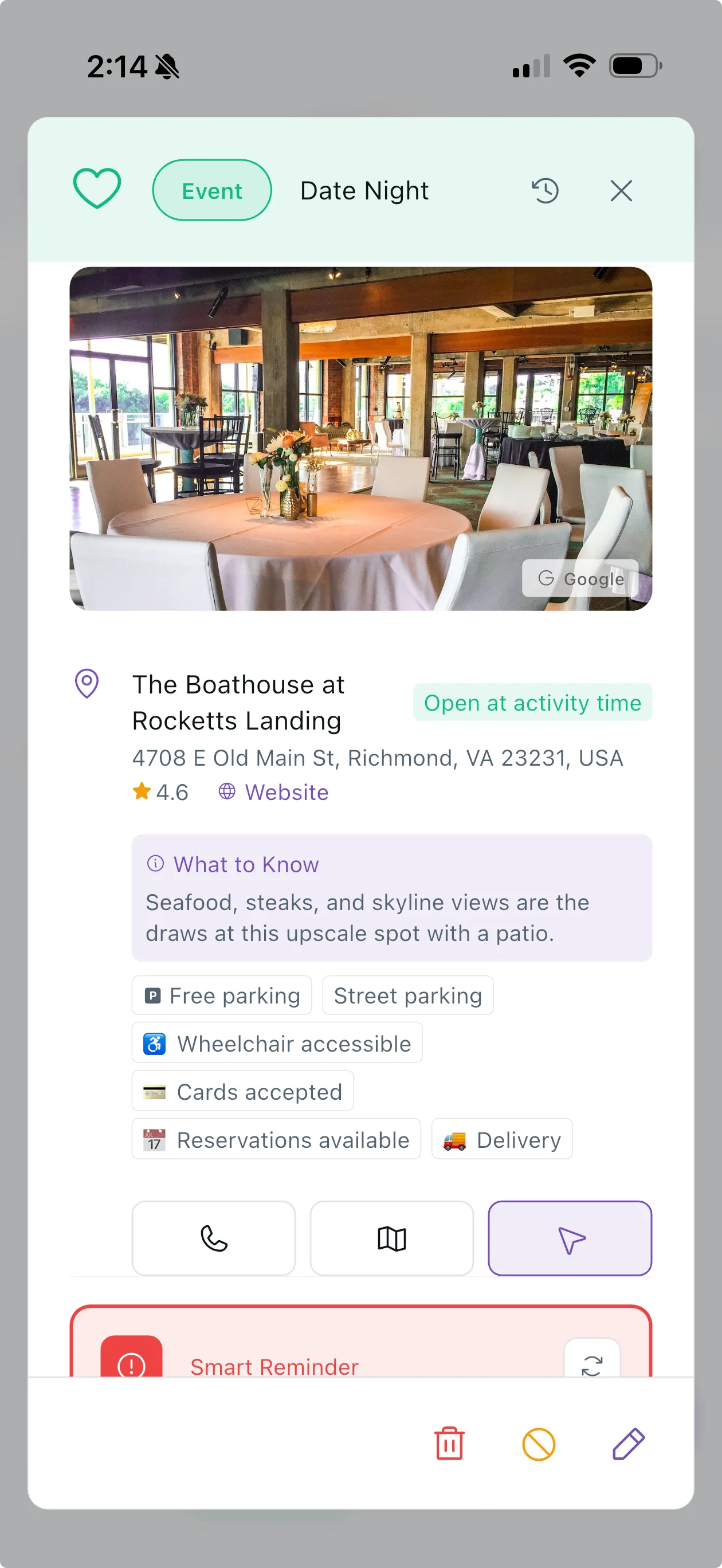
Parking, opening hours and accessibility for a place, plus an AI-written summary where one is available. Free on every plan.
-
Smart Reminders
Turn one on for an activity with a place and Zyve works out when to leave, using live traffic. Free gets 5 a month, Premium 25, Gold 50. Add-on packs never expire.
-
Explore
Find a place by vibe, time of day, who is coming and how far you will travel. Results are ranked on fit, weather, distance and ratings. Free gets 1 session a month, Premium 5, Gold 10.
-
Share the Load
Add people to an activity when you create it. They get a notification and can accept or decline. Activities nobody owns yet can be claimed.
-
Overlap Warnings
When you set a time, Zyve checks it against the schedules of the people on the activity and tells you if it overlaps something.
-
Private Activities
Mark an activity private and only the people you share it with can see it.
-
Morning Briefing
A notification at about 8am says how many activities your space has today and when your first one is. Premium and Gold add the weather and what to wear.
Built with:
100+ Templates
Create Activities in Seconds
Templates for everything families do. Each one fills in a title, an icon and a typical length, and some also set a start time or make the activity private.
Tasks
Household (Laundry, Walk the Dog, Water Plants), Quick Errands (Post Office, Bank, Pharmacy), Home Projects (Fix Something, Organize Closet).
Events
Appointments & Health (Doctor Appointment, Dentist Appointment, Vet Appointment, Therapy Session), Personal Care (Haircut, Nail Salon, Massage), Sports & Activities (Soccer Practice, Piano Lesson, Dance Class), and more.
Meetings
Work (Team Standup, Client Call, 1-on-1), Family & Coordination (Family Planning, School Conference, Carpool).
Busy Blocks
Work Focus (Deep Work, Writing Time), Personal Time (Exercise, Reading Time, Meditation).
Reminders
Time-Sensitive (School Pickup, Submit Form, Deadline Tomorrow), Follow-Ups (Follow Up, Send Email). Reminders have no length.
Places and Travel
Know Before You Go
Save the places you use, see the travel time between activities, and read parking, hours and accessibility before you arrive.
Saved Places
Save home, work, school, the gym and more once. Zyve fills in home or work where it fits, and remembers the last place you used for things like a dentist visit.
Travel Time Between Activities
My Planner shows how long it takes to get from one activity to the next. Gold adds traffic-adjusted leave-by times.
Place Details
Parking, opening hours and accessibility for a place, plus an AI-written summary where one is available. Free on every plan.
From Where You Are
When you turn on a smart reminder, Zyve starts from your current location, or from your saved home if your location is not available.
Coordination
Share the Load, Fairly
Assign activities, check for overlaps, and keep private things private.
Recommend and Accept
Add people to an activity when you create it. They get a notification and can accept or decline.
Claim What Is Unassigned
Activities nobody owns yet can be claimed by anyone in your space.
Overlap Warnings
Zyve checks a new time against the schedules of the people on the activity and warns you about overlaps.
Private Activities
Mark an activity private and only the people you share it with can see it.
Morning Briefing
Your Day, Before It Starts
A morning notification, a briefing screen and a look at the next 7 days.
The Notification
At about 8am: how many activities your space has today, and when your first one is. Tap it to open My Planner.
Weather and What to Wear
Premium and Gold add the forecast and clothing advice to that notification, and to the 4 hour, 1 hour and 10 minute reminders for outdoor activities.
The Briefing Screen
Today laid out as a timeline, with the people on each activity.
The Next 7 Days
The briefing screen also lists the next 7 days of activities you can see.
Simple Coordination
How it works
Three steps from an empty calendar to a planned day.
See It In Action
Calm in the Chaos
A short look at Zyve: the week and the details of each activity.
39 seconds, no sound required
- 1
Create Activities
Pick from 100+ templates or start from scratch. Doctor Appointment, Soccer Practice, Date Night, all quick.
- 2
Add the People Involved
They get a notification and can accept or decline, and Zyve warns you if the time overlaps something.
- 3
Stay On Time
A morning notification starts your day. Smart reminders use live traffic to tell you when to leave.
PRICING
Plans and prices
Zyve starts free, and the weather, travel and place intelligence is free on every plan. Premium and Gold are annual subscriptions that raise your monthly smart reminders and Explore sessions, and add Weekly Flow (Premium) or leave-by times (Gold).
Free
Core intelligence, limited smart reminders
No card needed
Free includes
- Unlimited activities
- 100+ activity templates
- Weather, travel, and place intelligence
- Overlap warnings and the morning notification
- 5 smart reminders per month
- 1 Explore session per month
- Reminders 10 minutes, 1 hour, or 4 hours before
Premium
Five times the smart reminders, plus Weekly Flow
- Yearly
- $14.99
Premium includes
- Everything in Free
- Weekly Flow, a look back at your household's week
- Weather and what to wear in your morning notification and outdoor reminders
- 25 smart reminders per month (5x Free)
- 5 Explore sessions per month
- Buy up to 5 more Explore sessions with smart reminders
- Cancel anytime
Gold
Leave-by times, and the most reminders and Explore sessions
- Yearly
- $29.99
Gold includes
- Everything in Premium
- Traffic-adjusted leave-by times in My Planner's day view
- 50 smart reminders per month (2x Premium)
- 10 Explore sessions per month
- Buy up to 10 more Explore sessions with smart reminders
- Cancel anytime
Smart reminder packs
One-time purchases that add smart reminders to your account. They never expire.
- 10 Smart Reminders
- $0.99
- 25 Smart Reminders
- $1.99
- 50 Smart Reminders
- $3.99
Prices are in US dollars. Premium and Gold renew until you cancel. Your smart reminders and Explore sessions reset on the 1st of each month. New accounts get a 14-day Premium trial with no card needed, and you stay on Free afterwards unless you subscribe. If you bought Premium or Gold before the move to annual plans, that purchase still works.
PRIVACY
Your Privacy Matters
No ads inside Zyve, and we do not sell your data. Zyve sends the places you search for and the routes you ask about to Google Maps services to get travel times and place details, and it does not track your location in the background.
- No Ads
- Never Sold
- No Background Location
- Delete Your Data
Common Questions
What is built into Zyve?
Every activity can carry its own context. Zyve shows the forecast and what to wear, the travel time between activities, and place details such as parking, opening hours and accessibility. All of that is free on every plan. The rest is a shared calendar: add people to an activity, let them accept or decline, and get a warning when times overlap.
What is free and what is paid?
Free includes unlimited activities, the 100+ templates, weather, travel and place intelligence, 5 smart reminders a month and 1 Explore session a month. Premium adds Weekly Flow (a look back at your household's week), the weather and what to wear in your morning notification and outdoor reminders, 25 smart reminders and 5 Explore sessions a month. Gold adds traffic-adjusted leave-by times in My Planner, 50 smart reminders and 10 Explore sessions a month.
How do smart reminders work?
A smart reminder works out when you should leave for an activity that has a place, using live traffic from where you are when you turn it on. You switch it on for each activity, and that uses one smart reminder. Activities you attend remotely cost none. You get 5 a month on Free, 25 on Premium and 50 on Gold, and the count resets on the 1st. If you run out, add-on packs of 10, 25 or 50 are one-time purchases that never expire, starting at $0.99.
What is Explore?
Explore finds places for an outing. Choose a vibe, from Coffee & Chill to Hidden Gems, then when you are going, who is coming, a cuisine if you want one, and how far you will travel. Zyve ranks nearby places on how well they fit, including the weather, distance, timing and ratings. Pick one and the new-activity flow opens with the place and a matching template already filled in, so you confirm the time and save. Free gets 1 session a month, Premium 5 and Gold 10.
How do the activity templates work?
There are 100+ templates across tasks, events, meetings, busy blocks and reminders. Each fills in a title, an icon and a typical length (reminders have no length), and some also set a start time or make the activity private. Tap Doctor Appointment and you get a 45 minute event. Change anything, or start from scratch instead.
What does Gold add?
Traffic-adjusted leave-by times in My Planner's day view, 50 smart reminders and 10 Explore sessions a month, and the option to buy up to 10 more Explore sessions with smart reminders. On Free and Premium, My Planner can show a locked Leave by hint that points to Gold.
What's the assignment flow?
Add people to an activity when you create it. They get a notification and can accept or decline. An activity nobody owns yet is unassigned, and anyone in your space can claim it.
What's in the morning briefing?
At about 8am Zyve sends a notification with how many activities your space has today and when your first one is. Premium and Gold add the forecast and what to wear. The briefing screen shows today as a timeline, with the people on each activity, and lists the next 7 days.
How does Zyve make money?
Zyve is free to use and has no ads. Premium is $14.99 a year and Gold is $29.99 a year, both billed yearly and cancellable anytime. New accounts get a 14-day Premium trial with no card needed, and you stay on Free afterwards unless you subscribe. Smart reminder packs are one-time purchases that never expire. If you bought Premium or Gold before the move to annual plans, that purchase still works.
Intelligence included. The calendar is calm. Available now.
Download Zyve for iOS or Android. Weather, travel time and place details are free on every plan, and new accounts get a 14-day Premium trial with no card needed.
OUR APPS
More from Zovia
- Zupply The grocery list that learns. Live
- Zistil Inventory Management Live
- Zots Counter & Schedule Tracker Live
- Zuzzle Number System Puzzles Live
- Zarden Plant care that thinks Live
We build apps for businesses too.
Work with us